
From alert to root cause, on one screen.
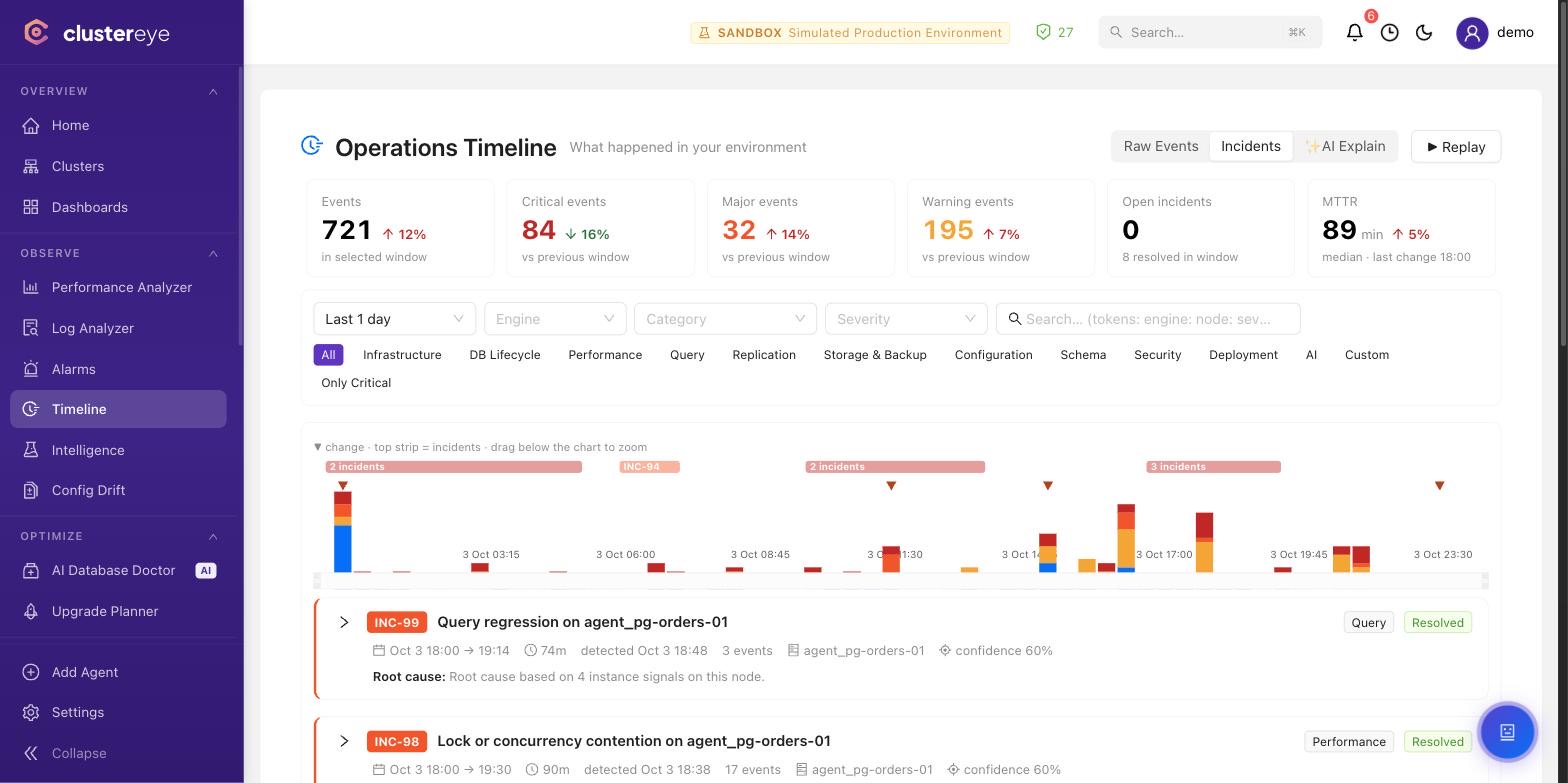
Alerts, configuration changes and failovers on one timeline; related events grouped under one incident.
The problems it solves
Alert noise hides the real problem.
Alerts →The answer to "what happened last night?" is scattered.
Operations Timeline →Failovers and replication changes go untracked.
Topology →The features that do it
Noise-free, anomaly-based alerts
Static thresholds are dead. ClusterEye learns your normal — replication lag, deadlocks, disk I/O — and pages you only when it actually matters.
- Seasonality awareness (hour/day/week)
- Slack, Microsoft Teams, email, webhook and mobile push
- Correlation — groups related alerts into one incident
- Evidence-grounded AI investigation — one click from an alarm, with competing hypotheses and evidence citations
Operations Timeline — what happened in your environment?
Alarms, metric anomalies, configuration changes, deployments and schema activity flow into a single timeline. The correlation engine automatically groups related events into incidents and flags the likely root cause — "what happened last night?" is answered on one screen.
- Unified event stream across every engine: alarms, metrics, queries, schema, config, replication
- Correlation-based incident grouping with confidence-scored root cause suggestions
- Live mode and historical replay; MTTR on the Alarms page
- AI Alarm Investigator — investigates an incident with a local (air-gapped) model over stored evidence only
See your cluster topology, live
Watch primaries, replicas, arbiters and shards on a live topology map, and keep a history of every failover and promotion.
- Each node's agent reports its replication peers — the topology assembles itself
- Streaming replication, replica sets, sharded clusters
- Track failover/promotion events historically
Database Fleet — provision the database, then keep it alive
The part of ClusterEye that is not monitoring: it provisions PostgreSQL (Patroni HA, streaming replication), MongoDB (replica sets, sharded clusters) and MySQL (InnoDB Cluster) onto your own servers, then operates them — adding and removing members and shards, rolling upgrades, switchovers, credential rotation, and pgBackRest (PostgreSQL) or XtraBackup (MySQL) backups. Every operation runs through a preflight → deploy → validation state machine, with rollback of completed steps. The last provisioning step installs the agent, so a cluster is monitored from the moment it exists.
- Production topologies for PostgreSQL, MongoDB and MySQL (ClickHouse on the roadmap)
- Day-2: add members and shards, rolling upgrades, switchover, backups, decommission
- Preflight → deploy → validation state machine; completed steps can be rolled back
See it in your team's environment.
A demo with your engines and your questions.