← All databases
O

Oracle Database monitoring

ClusterEye monitors Oracle through an agent using a read-only account — and it never queries the AWR views (DBA_HIST_*) or V$ACTIVE_SESSION_HISTORY. That means wait analysis, top SQL, blocking trees and tablespace forecasting without requiring a Diagnostics Pack or Tuning Pack licence. Both non-CDB and multitenant (CDB/PDB) deployments are supported; a single agent connected to CDB$ROOT can monitor every PDB. Supported versions: 12c — 23ai.

Agent-basedDefault port: 1521Versions: 12c — 23ai
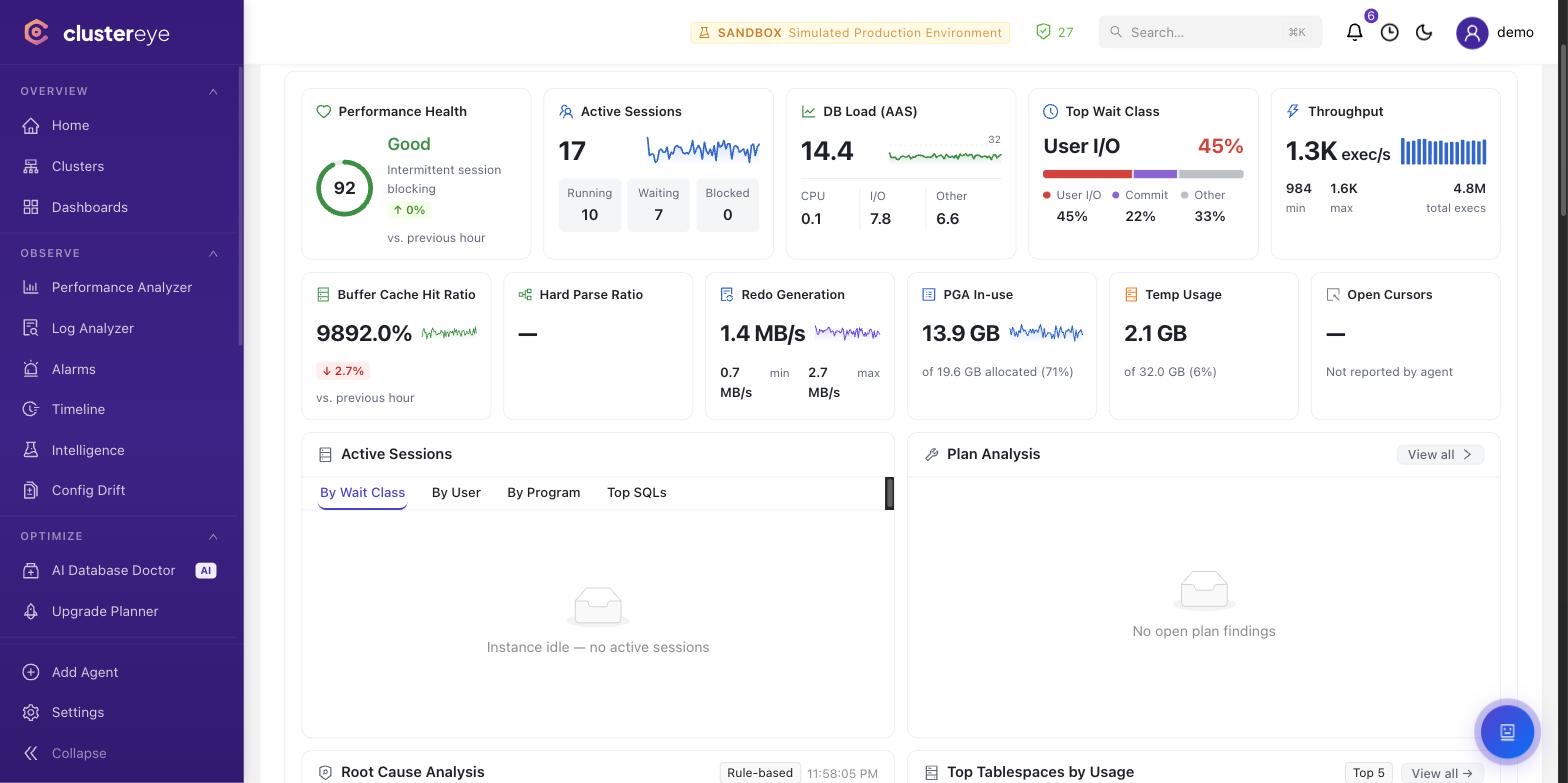
Oracle DB — ClusterEye Performance Analyzer

What we read

V$SESSION, V$SQL, V$SQLSTATS, V$SQL_PLAN, V$SQL_MONITOR — sessions, executing SQL, plans and runtime statistics
V$SYSTEM_EVENT, V$SYSSTAT, V$SYSMETRIC — the wait event profile and system metrics
V$RMAN_BACKUP_JOB_DETAILS, V$ARCHIVED_LOG — backup jobs, archive log generation and recoverability
V$DATAGUARD_STATS and related views — Data Guard lag and transport status
V$DIAG_ALERT_EXT — the alert log, read through the database rather than the filesystem
DBA_TABLESPACES, DBA_DATA_FILES, DBA_SEGMENTS — space usage and growth forecasting
DBA_USERS, DBA_ROLE_PRIVS, DBA_SYS_PRIVS — identity and privilege inventory
V$INSTANCE, V$DATABASE, V$PDBS and their CDB_ counterparts — instance and container topology

What it does specifically for Oracle

Wait Analysis Center

Wait events are grouped into classes, rendered as a heatmap over time, and correlated with the SQL that produced them — down to segment-level I/O, ITL and row lock waits.

Session Observatory and blocking trees

Active sessions are profiled live; blockers and waiters are resolved into a tree, naming the SQL and the object at the root of the lock.

SQL Tuning and Runtime Intelligence

Top SQL is scored by cost, plan stability and resource consumption; plan changes and literal-versus-bind problems are flagged, with index and statistics recommendations.

DML/DDL auditing and identity analytics

Oracle Unified Auditing records are scored by risk: bulk deletes, after-hours access, shared service accounts. Who changed what, from where and with which program is on the record.

RMAN and recoverability

Backup job history, archive log continuity and the recovery window are tracked, surfacing the gaps that would break a restore.

Minimum privileges required

The baseline is read-only and safe to grant in production.

sql
-- Non-CDB, or connecting to a single PDB service
CREATE USER clustereye IDENTIFIED BY "<strong-password>";
GRANT CREATE SESSION        TO clustereye;
GRANT SELECT_CATALOG_ROLE   TO clustereye;   -- V$/GV$/DBA_* views
GRANT SELECT ANY DICTIONARY TO clustereye;   -- V$SPPARAMETER, X$-backed views

-- Multitenant, connecting to CDB$ROOT (recommended for whole-container monitoring)
CREATE USER C##CLUSTEREYE IDENTIFIED BY "<strong-password>" CONTAINER=ALL;
GRANT CREATE SESSION        TO C##CLUSTEREYE CONTAINER=ALL;
GRANT SELECT_CATALOG_ROLE   TO C##CLUSTEREYE CONTAINER=ALL;
GRANT SELECT ANY DICTIONARY TO C##CLUSTEREYE CONTAINER=ALL;
GRANT SET CONTAINER         TO C##CLUSTEREYE CONTAINER=ALL;

Prerequisites

·Licensing: ClusterEye never queries DBA_HIST_* (AWR) or V$ACTIVE_SESSION_HISTORY — no Diagnostics/Tuning Pack license is required.
·The alert log is read through the database (V$DIAG_ALERT_EXT); no filesystem access is needed.
·The agent runs no DDL / DML / ALTER SYSTEM / KILL SESSION on Oracle.
·Collectors, query monitoring and tuning are toggled from Settings → Agent Configuration (not agent.yml).
Install and privilege details →

Frequently asked questions

No. ClusterEye never queries the DBA_HIST_* (AWR) views or V$ACTIVE_SESSION_HISTORY. Wait analysis, top SQL, blocking trees and tablespace forecasting are all derived from V$ and DBA_ views that carry no additional licence.

Start monitoring your Oracle DB estate in five minutes.

One command to install. Talk to us if you have questions.

Book a live demoInstall and privilege details